




Is Google Analytics accurate? Why GA4 data isn’t always reliable (and what marketers should do)
Here’s a question marketers always ask: Is Google Analytics accurate? Not entirely. The gap between what Google Analytics 4 (GA4) shows you and what’s actually happening on your site is bigger than most marketers expect.
GA4 has become one of the most misunderstood tools in a marketer’s stack. It’s useful for spotting trends and tracking general traffic patterns. But when it comes to precise attribution, conversion tracking, and ad performance measurement, the data you’re seeing is incomplete by default because of how many modern browsers are built.
At the start of 2026, WebFX spent a week testing how each major browser handles GA4 tracking. What they found will likely change how you think about the data sitting in your dashboard right now.
In this article, WebFX shares what the findings reveal, and what marketers can do about it:
Is Google Analytics accurate? Here’s the short answer
Is Google Analytics reliable for making real marketing decisions? Directionally, yes. Precisely, no.
GA4 does a reasonable job of showing you general traffic trends, broad channel performance, and on-site behavior patterns. But the moment you start using it to measure exact conversion counts, attribute revenue to specific campaigns, or justify ad spend to leadership, you’re working with data that has already been filtered, modeled, and estimated in ways most marketers don’t realize.
Google itself acknowledges this. When GA4 can’t track a user due to consent restrictions or browser limitations, it uses data modeling to fill the gap. That modeling can be useful, but it is an estimate, not a measurement. The difference matters when budget decisions are on the line.
The core issue is not GA4’s reporting interface or configuration. It’s what never gets collected in the first place.
Why Google Analytics is not accurate (the browser problem)
Most conversations about how accurate Google Analytics is focus on UTM parameters, session timeouts, or attribution windows (those matter). But the bigger problem starts before any of that, at the browser level.
To understand how much data GA4 actually captures, WebFX tested each major browser at the start of 2026 to see how they handle Google Tag Manager (GTM) and GA4 tracking by default. The results were more significant than expected.
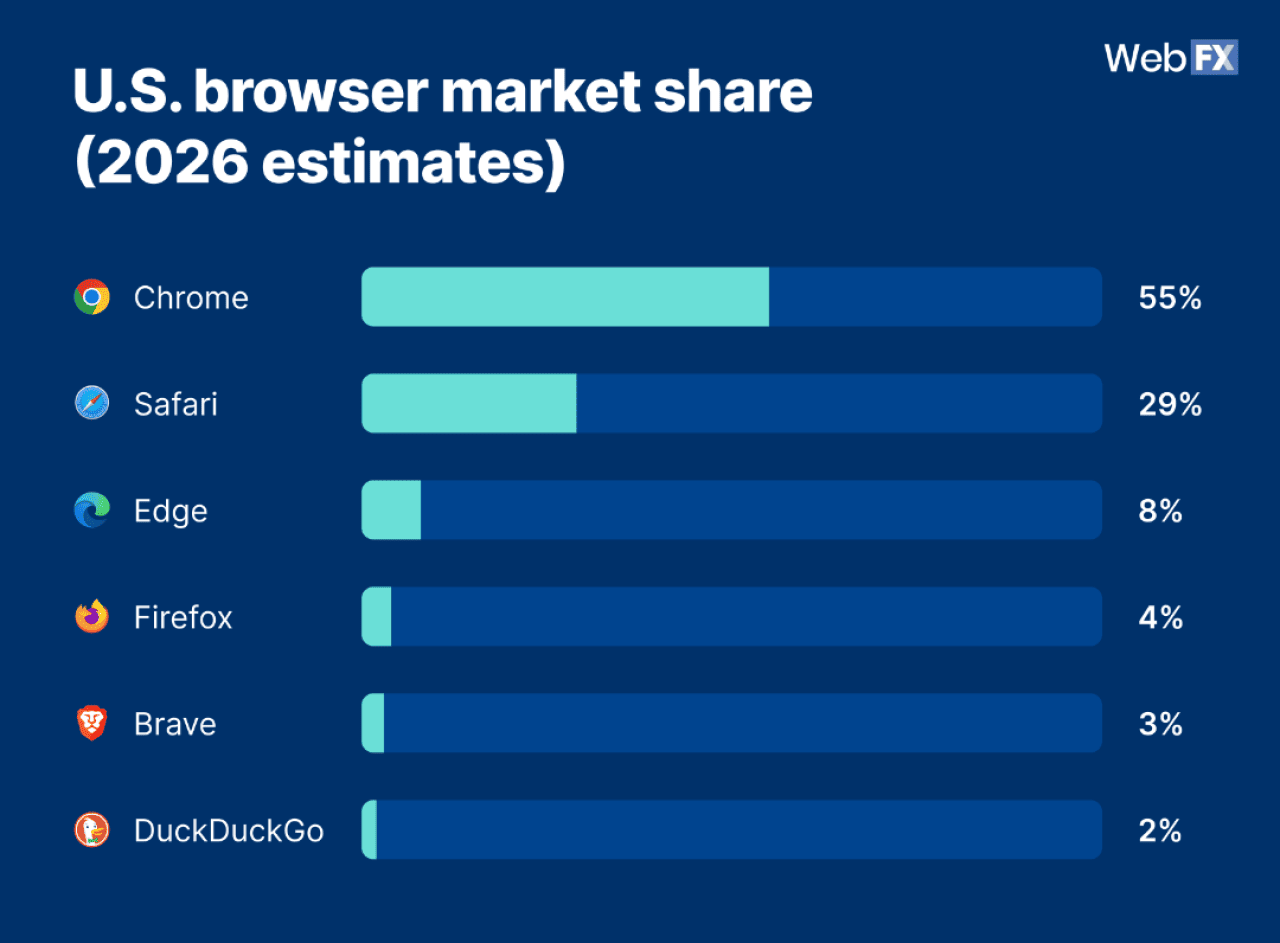
Here’s the current breakdown of the U.S. browser market share to put the numbers in context:
Which browsers block Google Tag Manager by default?
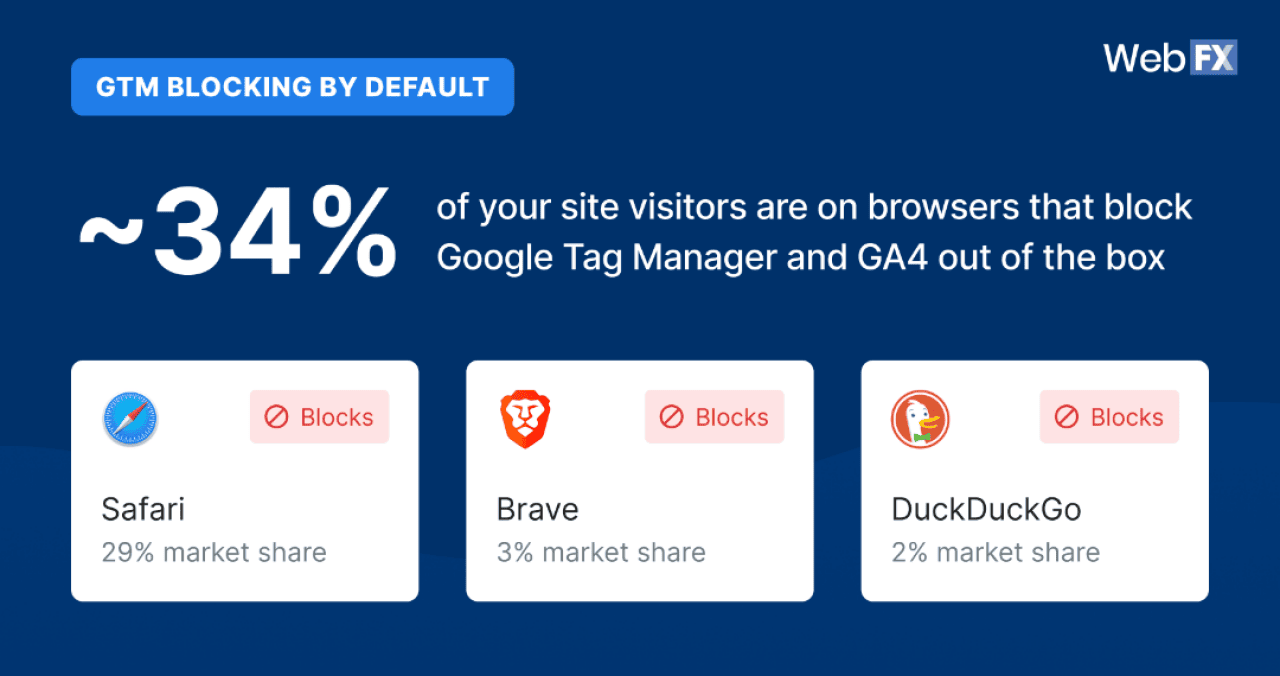
GTM is the most common way marketers deploy GA4, Google Ads tags, and other tracking pixels. In WebFX testing, the following browsers block everything deployed via GTM out of the box:
- Safari
- Brave
- DuckDuckGo
Add up their market share, and you get roughly 34% of your site visitors. That means in a best-case scenario, with no ad blockers and no custom browser settings, you are already missing more than a third of your GA4 data simply because of browser defaults.
What about Chrome, Edge, and Firefox?
Chrome, Edge, and Firefox do not block GTM by default, but that does not make them fully trackable. Each supports extensions and privacy settings that users can configure to block GA4 entirely.
Privacy-focused browsers like Tor Browser, which are growing in U.S. adoption, are not even accounted for in this analysis. And none of this accounts for cookie consent banners or ad blockers, which can prevent GA4 from firing entirely when a user opts out.
The roughly 34% figure is a floor, not a ceiling, and relying on data modeling to cover over one-third of your dataset is a bold move.
How much marketing data is GA4 actually missing?
The browser-blocking problem does not stop at Google Analytics. For marketers running paid campaigns, the data loss compounds significantly at the ad tracking level.


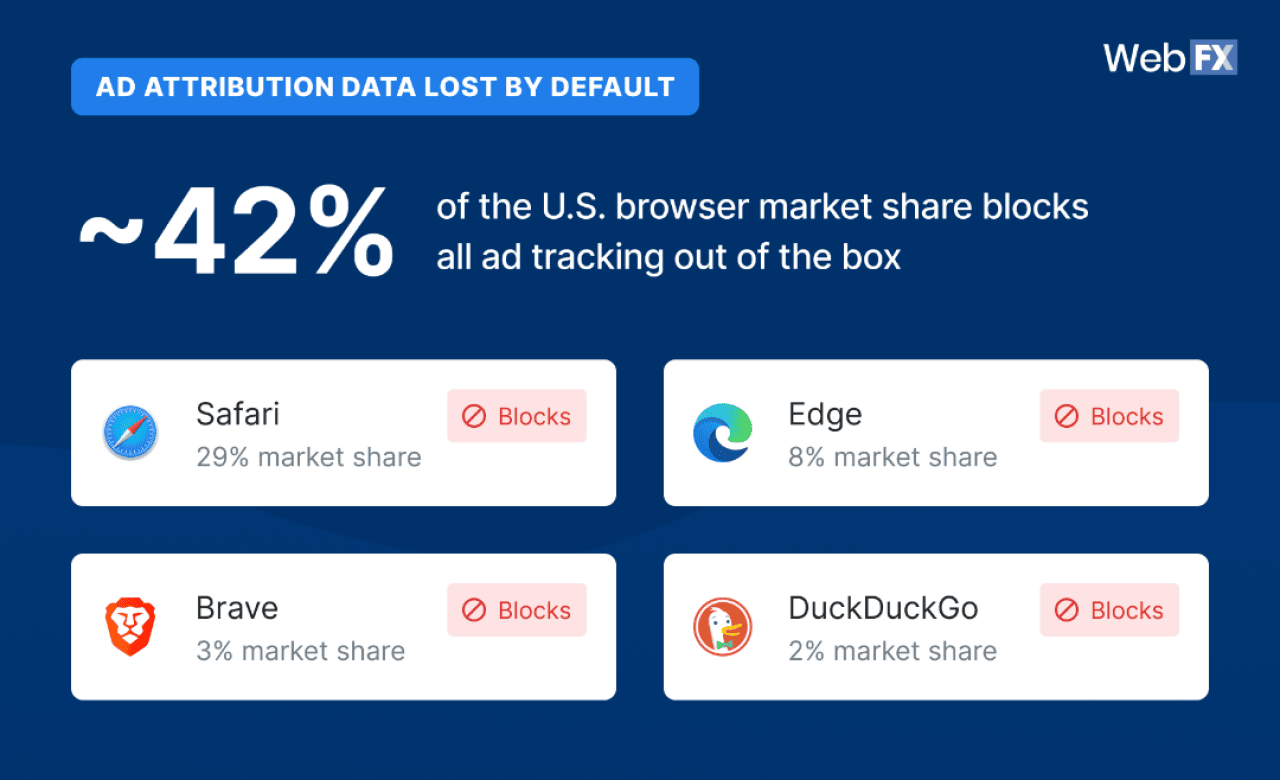
In WebFX testing, the following browsers block all common advertising tracking by default:
- Edge
- Brave
- Safari
- DuckDuckGo
That combination accounts for roughly 42% of the U.S. browser market share. So for any site running Google Ads, Meta Ads, Microsoft Ads, or programmatic advertising, plan to lose (or have modeled data) for at least 42% of your ad attribution data before a single user touches their privacy settings.
Then factor in ad blockers. A 2024 study by Ghostery conducted by Censuswide found that ad blocker usage among Americans has grown considerably, with 52% now using one compared to 34% in 2022. If that holds across your audience, more than half of the data in GA4, Google Ads, and Meta is either missing or modeled.
GA4 and the major ad platforms do offer data modeling to estimate what they cannot measure. But modeling becomes unreliable when the majority of your data is estimated rather than observed. At that point, you are not measuring marketing performance. You are approximating it.
What marketers should do about GA4 data gaps
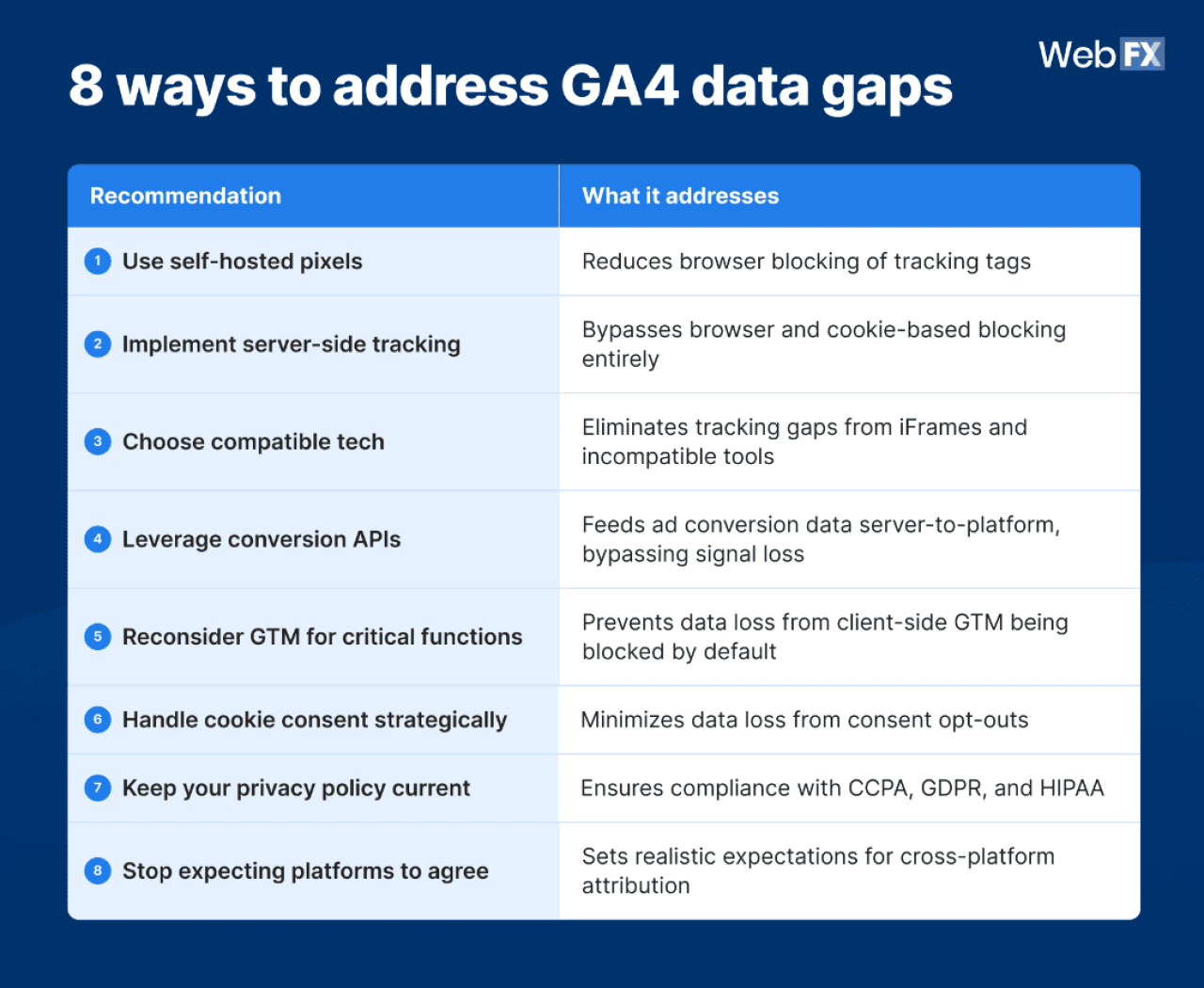
The thing is, understanding why Google Analytics is not accurate won’t fix the problem on its own. Knowing what to do about it will, and these inaccuracies are addressable. To address these inaccuracies, several data tracking strategies can help improve measurement reliability:
1. Use self-hosted pixels for marketing data tracking
Deploying your tracking pixels from a subdomain of your own domain, rather than through a third-party service, decreases the odds of them getting blocked. Google Tag Gateway is one example of this approach.
2. Implement server-side tracking when possible
Server-side tracking means you are not 100% reliant on cookies and JavaScript pixels. Because data collection happens at the server level rather than the browser level, it bypasses most blocking mechanisms. It is a robust long-term solution for keeping your tracking as optimal as possible.
3. Choose technology that works well together
Not all marketing tools play well together. Loading forms through iFrames, for example, adds layers of complexity that create unnecessary tracking hurdles. The result is missed data. Choose tools that integrate cleanly and reduce friction in your tracking setup.
4. Leverage conversion APIs to feed ad conversions
Conversion APIs (CAPIs) are offered by Google, Meta, Microsoft, LinkedIn, and many other advertising networks. They are a major push by ad platforms to eliminate signal loss. Optimal conversion tracking is crucial for ads to perform well, and CAPIs are becoming less and less optional with every year that passes if you want to see a positive return on investment (ROI) from your ads.
5. Reconsider GTM for anything critical to your business
Everything from marketing tracking to live chats can be deployed via client-side GTM (vs server side). However, given how often GTM gets blocked by major browsers, reconsider GTM for installation of anything critical to your business.
6. Discuss cookie consent requirements with your legal team
Start by determining with your legal team whether cookie consent is even required for your business. If it is, choose a consent banner and strategy that minimizes data loss while complying with applicable regulations. It is also smart to have data modeling capabilities in place so you can estimate the leads and revenue missed from users who opted out of tracking.
7. Keep your privacy policy up to date
Know what data you collect and how you use it, and work with your legal team to keep your privacy policy current. This process is also a good time to review whether your business needs to comply with data privacy laws such as the California Consumer Privacy Act (CCPA), General Data Protection Regulation (GDPR), or Health Insurance Portability and Accountability Act (HIPAA).
8. Know that no single platform will have all your marketing data
In 2026 and beyond, you need to view your marketing data from multiple lenses. Your website tracking data will look very different from your Google Ads data, for example, because Google has visibility into ad impressions that your site tracking will never capture. And never expect two analytics platforms to paint the exact same picture. There are too many nuances.
This story was produced by WebFX and reviewed and distributed by Stacker.


(0) comments
Welcome to the discussion.
Log In
Keep it Clean. Please avoid obscene, vulgar, lewd, racist or sexually-oriented language.
PLEASE TURN OFF YOUR CAPS LOCK.
Don't Threaten. Threats of harming another person will not be tolerated.
Be Truthful. Don't knowingly lie about anyone or anything.
Be Nice. No racism, sexism or any sort of -ism that is degrading to another person.
Be Proactive. Use the 'Report' link on each comment to let us know of abusive posts.
Share with Us. We'd love to hear eyewitness accounts, the history behind an article.