




AI workflow design: Build workflows AI can run end-to-end
AI workflow design is the process of building repeatable marketing workflows that an AI “teammate” can execute end-to-end using defined inputs, rules, and quality checkpoints. As AI evolves beyond one-off prompts, businesses can now automate multi-step processes with consistency and control.
OpenAI’s GPT-5.3 Codex signals this shift into the “AI teammate” era, enabling AI to plan, use tools, and execute workflows across multiple steps.
In this guide, WebFX teaches how to automate workflows with AI, recognize when a workflow is ready, and avoid the mistakes that cause agentic automation to fall apart.
Agentic AI models signal the ‘AI teammate’ era for marketing workflows
Recent developments in AI include models designed to take on long-running tasks involving planning, tool use, and execution — not just single-step assistance. These models are designed to perform better at tasks that look like real, day-to-day work outputs and structured deliverables, not just writing text.
Here’s what that means for marketing managers designing delegable workflows:
- It can handle full workflows, not just one-off tasks. You can delegate repeatable processes from start to finish, as long as the steps are clear and consistent.
- You’re meant to guide it as it works. The safest setup includes a few points where a human can review, approve, or stop the run.
- It can work across the tools you already use. That’s why it helps to define clean handoffs between analytics, ads, your CRM, docs, and spreadsheets.
- It’s a good fit for recurring deliverables. Weekly and monthly reports, QA checks, and competitive digests are easier to delegate because the format stays the same.
- It’s faster, so iteration is easier. When the model works more quickly, it’s more realistic to run a “draft-review-fix-rerun-rerun” loop without wasting time.
- Basic access rules still matter. Limit what the AI can touch, decide when it needs approval, and set clear “pause-and-ask” moments for anything sensitive.
If the model can execute across tools, your advantage comes from designing workflows that it can run reliably.
The AI teammate era means AI workflow automation at the team level
Most teams already use AI for tasks like drafting a post, rewriting a paragraph, summarizing a call, and brainstorming subject lines. That’s helpful, but it doesn’t change how work moves through your team.
Marketing workflow automation does. Instead of speeding up one step, it enhances speed and consistency across the whole process — the tool switching, manual checks, copy-paste handoffs, and “did anyone QA this?” moments that slow launches and create rework.
Here’s the difference:
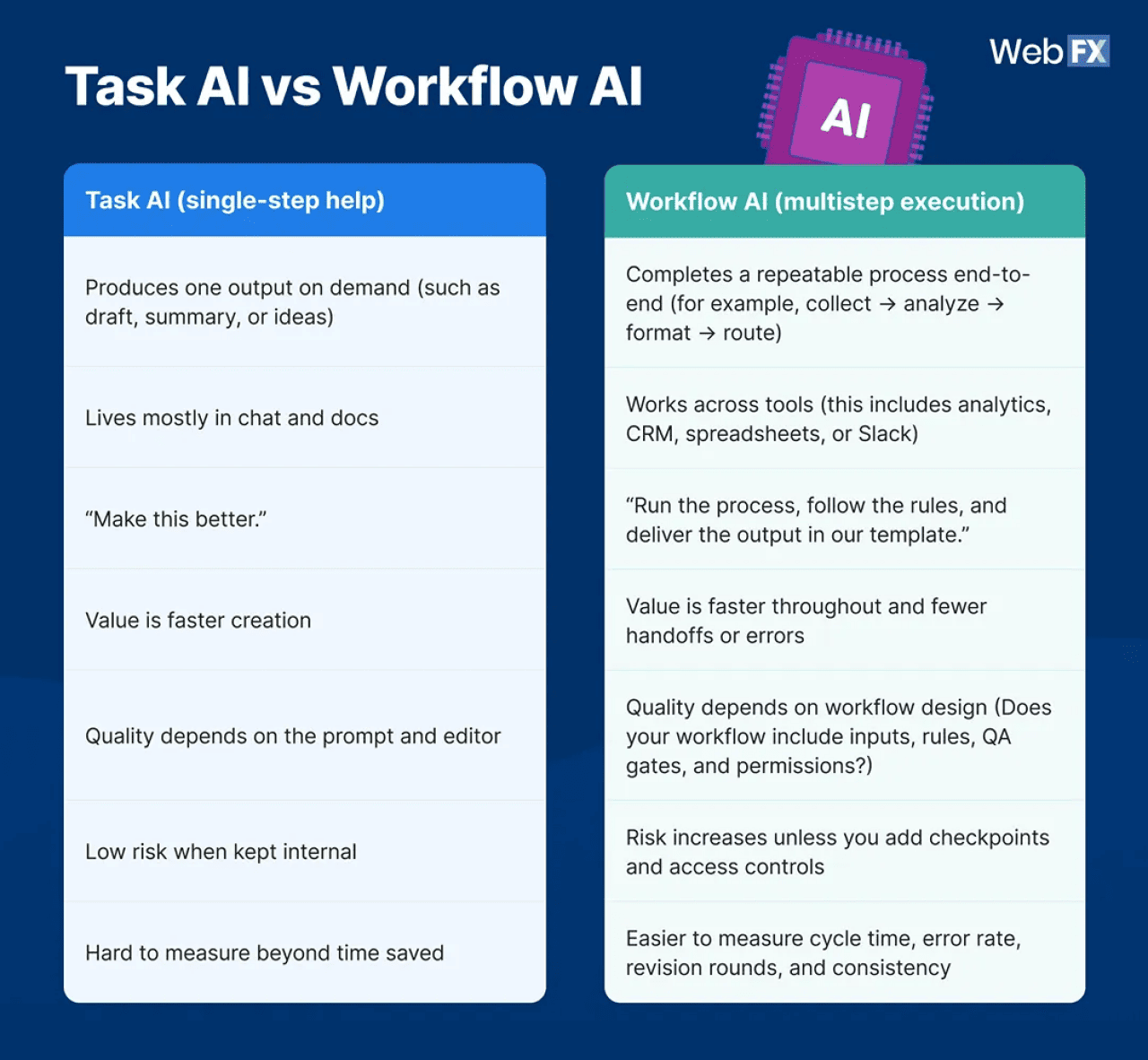
This shift matters because AI is not just a “wait-for-the-final-answer” model. It is something you direct and supervise while it works, with progress updates and the ability to steer midrun.
That interaction model maps directly to how workflow AI should operate in marketing: with clear checkpoints where a human can approve, correct, or halt the run.
Use this framework to see where you are in your AI marketing journey and what to build toward:
- Task help: AI supports a single step, such as drafting a report summary.
- Workflow delegation: AI executes a repeatable process across tools. For example, pull metrics, compare periods, flag anomalies, draft a narrative, and route for approval.
- Repeatable systems: The workflow runs on a schedule with templates, rules, permissions, and QA gates.
As agents become more capable, the advantage shifts to the teams that can design workflows humans can steer and supervise reliably, instead of relying on one-off prompts.
What a delegable workflow needs
Building an AI workflow that a team can trust requires several key elements. Delegation works when four ingredients are true at the same time:
- Clear inputs: The agent can reliably access the data it needs, such as where it lives, what time frame to use, and what fields matter.
- Explicit rules: Your team has written down what “good” looks like, plus thresholds and edge cases. For example, what to do when numbers spike, what sources are allowed, or what claims need citations.
- Defined output format: The deliverable is template-able. This could include a report structure, a QA pass/fail table, or a standardized brief.
- Human QA checkpoints: Specific moments where a marketer approves, corrects, or halts execution, especially before publish, spend changes, or outbound comms.
If any of these are missing, the agent doesn’t become a teammate. It becomes a faster way to create rework.
4-step marketing workflow decomposition guide
Here’s how to create an AI marketing workflow that can actually run. Use this guide if you want to convert a messy, multitool process into an agent-ready brief.
Think of it as translating “how we do this” into a system that an agent can execute with guardrails in place.
1. Map a recurring workflow
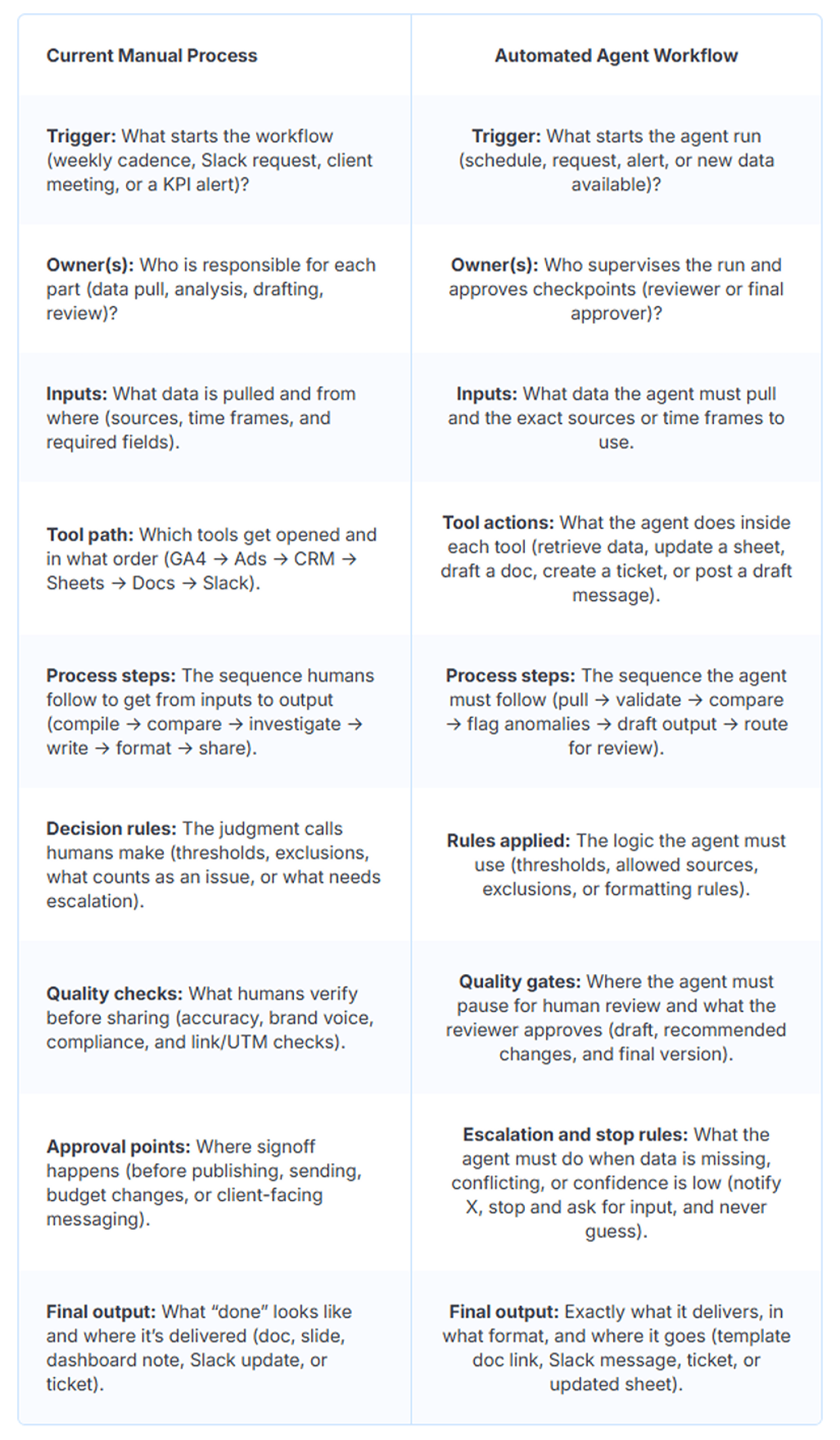
Pick one workflow your team repeats weekly, biweekly, and monthly. Then map it end-to-end:
- Who starts it and what triggers it? Is it a date, a Slack request, or a client meeting?
- What tools does it touch?
- What decisions happen along the way?
- Where do approvals happen?
As you map, highlight handoffs and bottlenecks. Those are usually where delegation pays off.
For example, a weekly PPC performance recap often includes these tasks: pull numbers from ad platforms, compare to last week, explain swings, propose next actions, format into a doc or Slack update, and send for review.
2. Identify the tools needed
List every app the workflow uses, whether it includes analytics, CRMs, ad platforms, PM tools, spreadsheets, docs, or Slack. Define what kind of access the workflow requires in each tool, because that determines permissions and where you add review gates.
A simple way to do that is to label each interaction as one of the following:
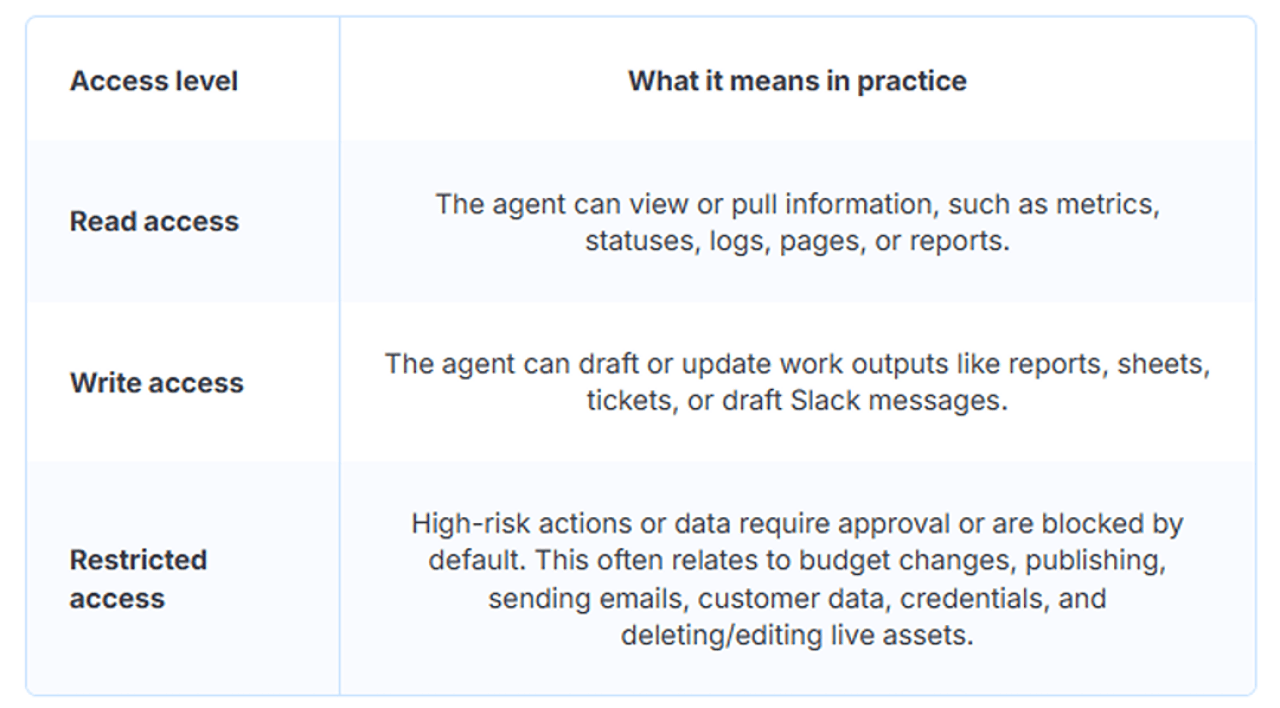
- Read actions: The agent only needs to retrieve information. Maybe it pulls metrics, checks statuses, reviews logs, or grabs screenshots.
- Write actions: The agent needs to create or update something, such as drafting a report, updating a Google Sheet, opening a Jira/Asana ticket, or posting a draft message in Slack.
- Sensitive actions: The agent would touch high-risk areas. Either sensitive data like customer details or credentials, or high-impact actions like budget changes, sending emails, or publishing pages. These should default to restricted access and require a human approval step.
For example, if your reporting workflow requires GA4, Search Console, and CRM attribution, you need clear access rules and a consistent schema for what gets pulled, when, and how it’s labeled.
3. Document the rules and process
Now spell out the standards your team relies on to keep output consistent:


- What metrics matter most, and what thresholds trigger action?
- What explanations are acceptable, and what is speculation?
- What sources are allowed for insights and benchmarks?
- When should the agent stop and ask for approval?
You should also document escalation and stop conditions. If the agent can’t access a tool, sees missing data, or falls below a confidence threshold, it should route to a human — not guess.
OpenAI’s rollout highlights that as agents become more capable, they also require stronger supervision and access controls, including monitoring, trusted access, and fallback behavior. So marketing workflow delegation needs the same basics: scoped permissions, escalation paths, and clear stop conditions.
4. Draft the agent brief
This is where you reframe steps into an outcome-driven brief that powers your AI marketing automation. Keep it tight and operational. Here’s an AI agent brief template you can use:
AI Agent brief template:
1. Executive summary
- Name of Agent: For example, Weekly Performance Narrator Agent.
- Objective: Write a one-sentence outcome, for example, “Produce a weekly marketing performance narrative with anomalies flagged and next actions recommended.”
- Key Value: Time saved, fewer errors, and faster turnaround. For example, “Reduce reporting time by 60% and cut revision rounds in half.”
2. Workflow mapping
3. Agent capabilities and tools
- Data Inputs: Tools like GA4, Search Console, CRM, ad platforms, spreadsheets, or call transcripts.
- Systems to Integrate (APIs/Access): Google, Meta, HubSpot/Salesforce, Asana/Jira, Slack, or Looker Studio.
- Tools to Use: Browser/computer use, spreadsheet editor, doc builder, data connector, or screenshotter.
- Access Levels:
4. Persona and tone (optional for LLM context)
- Role: For example, “You are a senior marketing operations analyst.”
- Tone: Concise, practical, skeptical of weak claims, or cite sources when needed.
- Output Style Rules: Use bullets for findings, include numbers, avoid hype, and label assumptions.
5. Rules, guardrails, and security
- Quality Standards: Accuracy checks, citation rules, formatting requirements, and brand constraints.
- Approval Gates: Where it must pause for human review.
- Escalation Path: If there is missing data, low confidence, or conflicting signals, who should it notify and how?
- Stop Conditions: When to halt instead of guessing. For example, “If tracking data is incomplete, stop and request confirmation.”
- Data Handling: PII handling, what can or cannot be stored, or retention limits.
- Permissions: Read-only defaults, least-privilege access, or credential handling.
6. Success metrics (KPIs)
Pick three to six metrics that match the workflow:
- Time-to-completion: For example, less than 30 minutes from trigger to draft output.
- Revision rounds: For example, one round on average.
- Accuracy/error rate: For example, 98% metric accuracy and zero missing required fields.
- Consistency: For example, 100% adherence to the template and required sections.
- Business impact (optional): For example, faster launch cycles, fewer QA issues, and improved reporting adoption.
If you can hand that brief to a new hire and they’d understand what “done” looks like, you’re close to agent-ready.
5 workflows that are perfect AI teammate pilots
If you’re wondering which workflow you should automate, here are practical candidates for marketing workflow automation that are repeatable, structured, and measurable.
- Weekly reporting narratives and anomaly notes: An AI agent for this workflow would be able to pull metrics, compare periods, flag spikes or drops, draft insights in your template, and pause for approval.
- Competitive intel digest: The AI can check a defined set of competitor pages, ads, or keywords, log changes, summarize trends, and produce a consistent brief.
- Campaign QA workflow: The AI teammate verifies UTMs, tracking, landing page requirements, link checks, naming conventions, and stops at a launch gate.
- Content refresh queue: This AI agent would identify pages to update, suggest improvements, draft updates with sourcing notes, and route for editorial review.
- Sales enablement repurposing: The AI converts one approved asset, such as a case study or webinar, into a set of channel outputs with brand constraints and review steps.
If you’re trying to decide what to delegate, start with workflows where the output format is stable and the QA gate is obvious.
Where most teams get it wrong
AI can absolutely streamline operations, but it follows your process exactly. If the workflow is unclear or inconsistent, automation tends to create even faster confusion rather than faster results. Common breakdowns look like this:
- Missing rules: The agent can’t infer your standards, so you get inconsistent outputs.
- Unclear ownership: Nobody is accountable for quality, approvals, and updates to the workflow brief.
- No QA gates: Nobody outlined constraints regarding hallucinations, wrong data pulls, brand or compliance issues, and “almost right” work that still requires heavy rework.
- Messy inputs: The AI doesn’t complete tasks effectively when you feed it incomplete tracking, inconsistent naming, scattered docs, or conflicting dashboards.
- Poorly defined tool access: Too much permission creates risk. Too little access makes the workflow unusable.
A lightweight safeguard model helps:
- Put human-in-the-loop checkpoints at publish or spend moments.
- Version your agent brief and prompts.
- Define “stop” conditions so the agent asks instead of guessing.
Even OpenAI positions steerability and supervision as essential to effective agent work. So missing QA gates isn’t a minor flaw. It breaks delegation.
Agent-ready workflow criteria
Use this quick rubric to judge whether a workflow is ready for delegation as part of your AI workflow design process.
A workflow is a good candidate if you can answer “yes” to most of these:
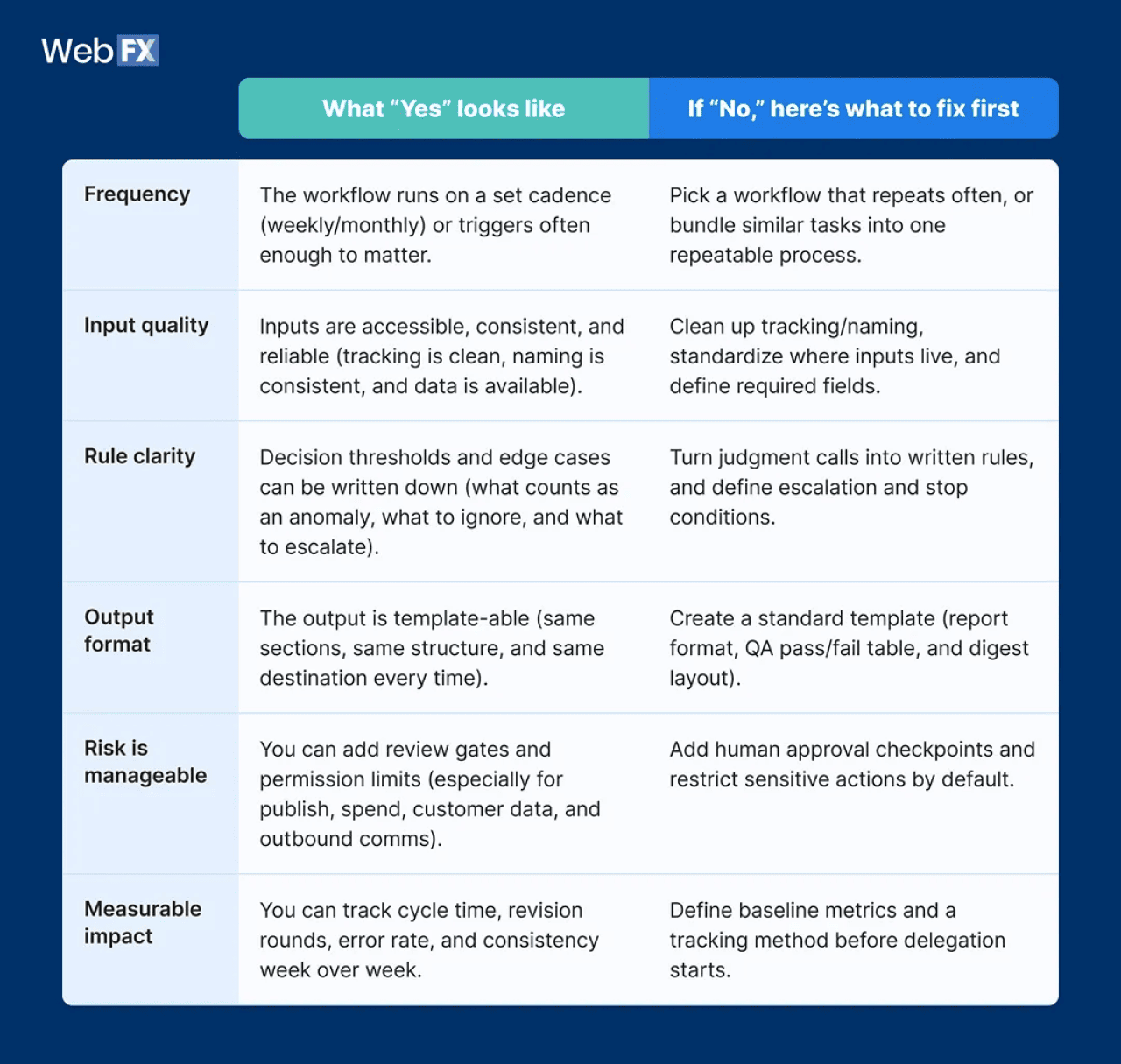
The overall verdict:
- 5–6 “Yes” answers: You’re in a good place. This workflow is ready to delegate — just keep the review gates in place.
- 3–4 “Yes” answers: Close. Start with a smaller version (read-only + draft output), then expand once your inputs and rules are clearer.
- 0–2 “Yes” answers: Not yet. Use the “what to fix” column as your cleanup list, then rerun the rubric.
This story was produced by WebFX and reviewed and distributed by Stacker.


(0) comments
Welcome to the discussion.
Log In
Keep it Clean. Please avoid obscene, vulgar, lewd, racist or sexually-oriented language.
PLEASE TURN OFF YOUR CAPS LOCK.
Don't Threaten. Threats of harming another person will not be tolerated.
Be Truthful. Don't knowingly lie about anyone or anything.
Be Nice. No racism, sexism or any sort of -ism that is degrading to another person.
Be Proactive. Use the 'Report' link on each comment to let us know of abusive posts.
Share with Us. We'd love to hear eyewitness accounts, the history behind an article.