




AI browser comparison 2026: Atlas, Comet, Dia and 5 more ranked and reviewed
The arrival of AI browsers has taken the Internet experience by storm.
Gone are the days of opening a dozen tabs just to compare flights, copying and pasting between documents, and manually hunting for promo codes at checkout (all while your traditional browser just sits there, watching you struggle).
With AI web browsers, you can directly ask questions and get instant custom answers across your open tabs, automate multistep tasks, and have an intelligent assistant that actually understands (and solves) what you’re trying to accomplish. But the thing is, there aren’t just a couple of AI browsers vying for your attention.
If you’ve heard about ChatGPT Atlas, Perplexity Comet, or Dia (the list goes on) and wondered which AI browser actually does the job, you’ve come to the right place. In addition to providing research, this AI browser comparison breaks down eight AI browsers available in 2026, comparing features, pricing, privacy, and performance side-by-side to help you find the right fit.
Below, WebFX looks at these AI browsers for your workflow:
What is an AI browser? (and why it’s changing the web)
An AI browser is a next-generation web browser built with native artificial intelligence (AI) integration (not just plug-ins or extensions). Instead of acting as a static window to the Internet, an AI web browser works as an intelligent assistant that understands context, remembers actions across tabs, and helps you complete tasks faster.
Here’s the key difference: Traditional browsers display information, but AI browsers interpret it. They summarize articles, answer questions, automate form-filling, and even perform multistep tasks like researching products or comparing prices, all in real time.
AI browsers generally fall into two types:
- Smart assistant browsers enhance your workflow with built-in chat, summarization, and quick answers. Examples include Arc Max, Brave Leo, and Microsoft Edge with Copilot.
- Agentic browsers take it a step further by browsing, acting, and completing tasks for you. ChatGPT Atlas, Perplexity Comet, and Dia lead this frontier.
This shift marks the evolution from search-based to AI-assisted browsing. Instead of finding links, your browser now finds synthesized answers, turning the Internet into an interactive, personalized experience designed to think and act alongside you.
How these AI browsers were evaluated (the review criteria)
The AI browser war has officially begun. And to determine how each option performs in 2026, each option across six key criteria was evaluated:
- Core AI features: What can the browser actually do? Does it summarize content, automate tasks, or answer questions? Assess the depth and usefulness of each AI capability.
- Speed and performance: How quickly does the AI respond? Does the browser slow down during heavy use? Performance matters when you’re trying to work efficiently.
- Privacy and data handling: Where does your data go? Is AI processing local or cloud-based? Can you opt out of data collection? Privacy policies reveal how each browser treats your information.
- Pricing and accessibility: Is it free or subscription-based? What features are locked behind paywalls? Examine the cost-to-value ratio for each AI browser.
- Platform availability: Does it work on Windows, Mac, Linux, or mobile? Many AI browsers currently limit platform support.
- Use case fit: Which browser excels at research versus automation versus privacy? Different AI web browsers serve different needs.
This AI browser comparison draws from official documentation, user reviews, publicly available testing data, and hands-on analysis to give you an accurate and comprehensive breakdown of your options
AI browser comparison (at a glance)
Before diving into the full reviews, here’s a quick look at how all eight AI browsers compare across core features, pricing, and platform support.
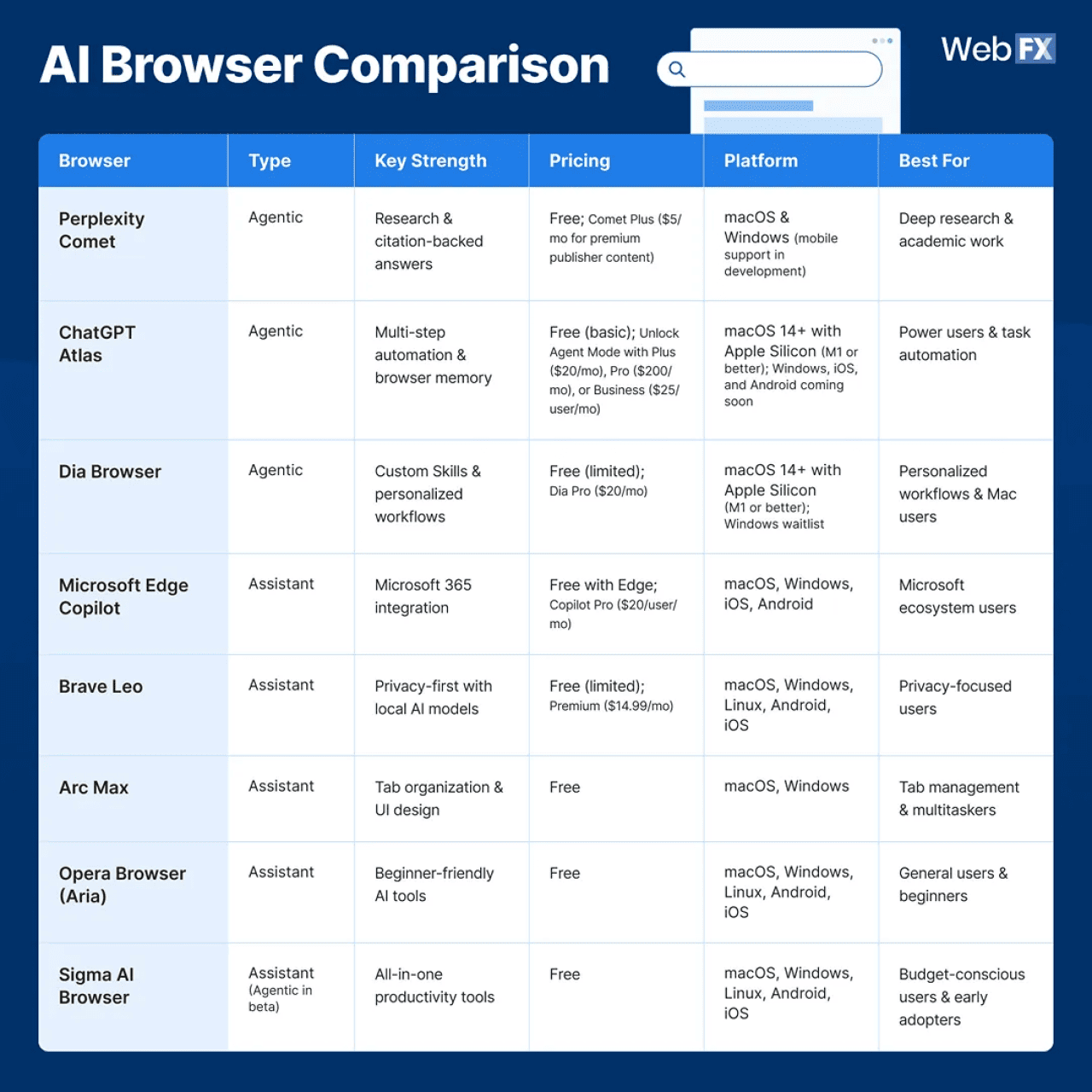
AI Browser Comparison
AI browsers do very different things. The primary consideration for users is which tool aligns with their specific workflow. Below is a rundown of eight AI browsers, including features, pricing, and target use cases:
1. Perplexity Comet
Perplexity Comet is what happens when a search engine company builds a browser. Launched in July 2025 and made free globally that October, Comet replaces Google’s search entirely with Perplexity’s AI engine, turning every query into a cited, multisource answer instead of blue links. The result is a browser that doesn’t just take you to information. It synthesizes it, cites it, and helps you act on it.
Comet treats research like a conversation. Ask about quantum computing, and it pulls information from multiple sources, provides inline citations, and maintains context as you explore tangents across tabs. Need to compare mortgage rates? Comet can scan multiple bank sites, extract key terms, and summarize everything for you in seconds.
Key features:
- Citation-backed answers: Every response includes inline sources for trustworthy research
- Contextual understanding: Comet keeps track of your ongoing task or query and adapts as you explore
- Voice interaction: Ask questions hands-free and get spoken responses
- Action-based AI tasks: Use AI to organize tabs, draft replies, create study plans, build simple web assets, or shop for products
- Free globally: No paywalls for core features (optional Comet Plus at $5/month adds premium publisher access)
Strengths:
- Research capabilities: Automatic citations and source synthesis are designed to reduce manual searching time.
- Free access: Most features are available at no cost; Comet Plus applies to specific premium publisher content.
- Cross-platform availability: Works on both Mac and Windows, with mobile in development
- Versatile assistant: “AI that understands, organizes, builds, emails, creates, shops” matches a wide range of tasks
Weaknesses:
- Requires granting data access for AI tasks: Some features need permission to analyze on-screen content. While user-controlled, it’s not as privacy-focused as Brave Leo.
- Interface feels generic: Comet’s design closely resembles Chrome with a dark theme. If you’re hoping for Arc’s innovative UI or Dia’s fresh approach, you’ll be disappointed by the conservative aesthetic.
- Still evolving: As a relatively new browser (fully launched October 2025), some features feel experimental, and occasional bugs pop up during heavy research sessions.
Ideal use cases:
Students, researchers, journalists, and knowledge workers who spend hours diving into complex topics and need reliable, cited information fast. Comet shines when you’re comparing options (insurance plans, product specs, academic papers), following research rabbit holes, or building arguments that require source credibility. If “cite your sources” is a regular part of your workflow, Comet eliminates the tedious copy-paste-format loop.
Pricing:
- Free: Full browser access with unlimited AI search, citations, cross-tab context, and agentic features
- Comet Plus: $5/month (adds access to premium publisher content from partners like The New York Times, Wired, and Condé Nast publications)
- Note: Perplexity Pro ($20/month) is a separate subscription for the Perplexity search engine with advanced AI models, and it’s not required for the Comet browser.
What users are saying:
Initial reception has noted the efficiency of the citation feature. Users have highlighted its utility for academic work. The main criticisms focus on the generic interface and occasional context-switching confusion when Comet tries to maintain awareness across too many tabs.
2. ChatGPT Atlas
Launched in October 2025, ChatGPT Atlas is OpenAI’s Chromium-based browser built from the ground up with ChatGPT woven into every interaction. Unlike traditional browsers with AI bolted on, Atlas puts ChatGPT directly in your sidebar, ready to understand what you’re viewing, remember context across sessions, and execute actions through Agent Mode.
Atlas is ChatGPT with hands. It can fill forms, compare products across tabs, book reservations, and handle workflows that normally require dozens of clicks. Every tab becomes a workspace where AI can read, act, and automate on your behalf.
Key features:
- Agent Mode (preview): Performs multistep workflows (open tabs, navigate sites, fill forms, compare products) under your supervision
- Browser memories: Remembers key details from sites you visit (stored for 30 days and fully user-controlled)
- Context-aware sidebar: ChatGPT understands your current page without copying/pasting
- Inline writing assistance: Highlight text to rewrite, refine, or generate suggestions
- Multimodal search modes: Search using text, images, videos, or news sources directly from the browser
Strengths:
- High-capacity automation system: Agent Mode can genuinely complete workflows like researching, comparing, and shopping end-to-end
- Persistent context across sessions: Browser memory lets Atlas recall preferences and details you choose
- Productivity features: Ideal for users who delegate repetitive online tasks
Weaknesses:
- macOS-only availability: Atlas only runs on macOS 14+ with Apple Silicon (M1+). Windows, iOS, and Android versions are “coming soon” with no firm timeline.
- Agent Mode accuracy issues: Agent Mode shows promise, but has typical new-feature growing pains and occasionally makes mistakes during complex automation.
- Premium features locked behind paywalls: The free version feels limited, with Agent Mode requiring Plus, Pro, or Business subscriptions.
Ideal use cases:
Mac users who spend significant time on repetitive web tasks like form filling, product research, booking travel, or managing workflows across multiple sites. Atlas is designed for professionals and power users seeking time savings through automation. For current ChatGPT Plus or Pro subscribers on Mac, Atlas offers an integrated browsing experience.
Pricing:
- Free: Limited features, basic ChatGPT Atlas access
- Plus: $20/month (unlocks Agent Mode preview)
- Pro: $200/month (higher rate limits, priority access)
- Business: Starting at $25/user/month (team features, admin controls)
- Note: Agent Mode requires a paid subscription (Plus, Pro, or Business)
What users are saying:
Reddit and tech forums show cautious excitement mixed with practical concerns. The macOS-only requirement frustrates Windows users, and several people mention Agent Mode’s accuracy issues. The consensus is that if you’re deep in the Apple ecosystem and already paying for ChatGPT, Atlas delivers. For everyone else, the wait-and-see approach makes sense until broader platform support arrives.
3. Dia Browser
Dia Browser is an AI-focused application from The Browser Company and a departure from the Arc browser. Launched in beta in June 2025 and now offering a Pro tier, Dia simplifies the interface compared to Arc and integrates AI features. The URL bar functions as a command center for navigating websites, performing searches, or providing AI instructions.
Dia includes a “Skills” system, which allows for the creation of customizable AI shortcuts through natural language prompts. For example, a user can request a reading mode that removes sidebars and ads, and the browser generates the shortcut. The system can also be used to auto-fill job applications or summarize emails. This provides browser automation designed for ease of use.
Key features:
- Skills system: Create custom AI-powered shortcuts for repetitive tasks by describing what you want in plain language
- Context-aware AI sidebar: Understands your open tabs, browsing history, and can act across multiple sites
- URL bar as command center: Navigate, search, or prompt the AI, all from one input field
- Privacy-focused by design: Browsing data encrypted locally, minimal server processing, deletable at any time
- Built on Arc’s foundation: Inherits Arc’s stability and Chromium compatibility while simplifying the interface
Strengths:
- Customization: The Skills feature allows for browser automation without coding, using plain English descriptions.
- Privacy-conscious AI implementation: Unlike Comet or Atlas, Dia encrypts data locally and gives you granular control over what the AI can access.
- Suitable for former Arc users: For those who appreciated Arc’s innovation but found it complex, Dia provides AI features with a simplified interface.
Weaknesses:
- Limited platform availability: Dia currently runs only on macOS 14+ with Apple Silicon (M1+). A Windows waitlist exists, but there’s no confirmed release timeline. Linux, iOS, and Android support haven’t been announced.
- Early-stage product: As a recently launched browser, Dia has areas that need polishing. Skills occasionally misfire, and complex AI requests don’t always land perfectly.
- Pro tier required for unlimited use: The free tier has usage limits on AI features. Dia Pro ($20/month) unlocks unlimited AI chat and Skills.
Ideal use cases:
Mac users who want a personalized AI agent that learns their habits without manual setup. Dia excels for people with repetitive browser workflows like content creators who need consistent formatting, researchers who visit the same sites daily, or professionals who fill similar forms repeatedly. If you found Arc too complex but love the idea of a smarter browser, Dia is your entry point.
Pricing:
- Free: Limited AI usage
- Dia Pro: $20/month (unlimited AI chat and Skills, priority features)
What users are saying:
Early adopter feedback has been mixed. Users have noted the Skills concept and the interface design, though some report technical issues and AI misunderstandings with complex instructions. The macOS-only limitation and $20/month Pro tier have drawn criticism, especially since Comet offers similar features for free.
4. Microsoft Edge Copilot
Microsoft Edge Copilot isn’t just a browser with AI sprinkled in. It’s strategically designed to be the front door into Microsoft’s AI ecosystem. Built on Chromium and deeply integrated across Windows 11, Microsoft 365, and Bing, Copilot transforms Edge into a productivity dashboard where AI can draft emails, summarize documents, rewrite text, generate images, and even assist with coding right inside the browser.
Unlike Atlas or Comet, Edge Copilot doesn’t try to reinvent browsing. Instead, it supercharges the traditional browser with enterprise-grade AI tools that seamlessly connect to your work apps, including Outlook, Word, Excel, Teams, OneDrive, and SharePoint. For power users and enterprise environments, this level of integration is where Copilot shines.
Key features:
- Native Microsoft 365 integration: Seamlessly works across Word, Excel, PowerPoint, Outlook, and Teams for cross-app AI support
- Copilot Mode: A dedicated browsing mode that surfaces AI tools as you work, helping you stay focused and get things done faster
- Copilot Vision: Screen-level understanding that analyzes the content on your screen (including open tabs and documents) to offer contextual suggestions
- Copilot Actions: Rewrite text, summarize pages, extract insights, generate images, unsubscribe from emails, autofill simple forms, and complete lightweight workflow tasks
- Voice commands: Ask questions, navigate tasks, or generate content hands-free
- Free tier included: Core Copilot features available to all Edge users
Strengths:
- Extensive Microsoft integration: If you’re already using Microsoft 365, Copilot is the only AI browser that genuinely connects your browser to your entire workspace. Move seamlessly between web research and document creation.
- Completely free for basic features: Unlike Atlas or Dia Pro, Edge Copilot’s core functionality costs nothing. The free tier delivers real value without hitting paywalls.
- Cross-platform availability: Works on Windows, Mac, iOS, and Android. No Apple Silicon requirements or platform restrictions.
- Strong for enterprise environments: IT-friendly, secure, and built for productivity workflows.
Weaknesses:
- Copilot Actions are still inconsistent: The automation features are hit-or-miss. Users report Actions claiming to complete tasks that didn’t actually execute, requiring manual verification.
- Privacy concerns for non-Microsoft users: Edge collects browsing data to improve Copilot, and for privacy-conscious users outside the Microsoft ecosystem, this integration could feel invasive.
- Advanced features require Microsoft 365: While basic Copilot is free, the deep productivity features that make it compelling require an active Microsoft 365 subscription.
Ideal use cases:
Windows users and Microsoft 365 subscribers who want AI assistance without switching browsers or ecosystems. Edge Copilot excels for office workers juggling email, documents, and web research simultaneously. If you’re already paying for Microsoft 365 and spend your day in Outlook, Teams, and Office apps, Copilot eliminates the friction of copying information between your browser and productivity tools.
Pricing:
- Free: Basic Copilot features in Edge browser (summarization, chat, basic automation)
- Microsoft 365 Personal/Family: $6.99-$12.99/month (includes enhanced Copilot features)
- Copilot Pro: $20/user/month (priority access to latest AI models, faster responses, Copilot in Microsoft 365 apps)
- Note: Copilot Pro is a separate subscription from Microsoft 365, but it works most effectively when combined with it.
What users are saying:
User reaction is mixed and highly dependent on existing Microsoft investment. Microsoft 365 users appreciate the seamless integration and find genuine productivity gains, especially when moving between web research and document creation. However, users outside the Microsoft ecosystem find Edge Copilot less compelling than Comet or Atlas.
5. Brave Leo
Brave Leo is the built-in AI assistant inside the Brave Browser, and true to Brave’s philosophy, it’s designed to give you AI without sacrificing privacy. Unlike most AI browsers that rely heavily on cloud processing, Leo routes requests through an anonymizing server and offers local model options, so your prompts aren’t tied to your identity.
Leo isn’t trying to automate your entire workflow like Atlas or reinvent research like Comet. Instead, it enhances everyday browsing: Summarizing pages, answering questions, generating text, and translating content, all while keeping your data shielded from tracking.
Key features:


- Privacy-first architecture: Requests pass through Brave’s relay server, hiding your IP address
- Emerging local model support: Brave is rolling out on-device processing options to reduce cloud exposure
- Webpage and document summarization: Summarize articles, PDFs, Google Docs, sheets, and more
- Writing and rewriting tools: Improve tone, clarity, or shorten/expand text on any page
- Multimodal support: Can analyze images and transcript-based video content depending on the model
- Model flexibility: Choose from Brave’s models (Mixtral), Llama, and others
- No login required: Use Leo immediately, no Brave account needed
Strengths:
- Strong privacy: No login required, prompts aren’t stored, and your IP is hidden through Brave’s relay. For privacy-first users, this is a distinct option compared to mainstream AI browsers like Edge, Comet, or Atlas.
- Free tier is genuinely useful: Summaries, rewriting tools, and chat all work without paying.
- Works everywhere: Available on Windows, macOS, Linux, iOS, and Android.
- Local models reduce data exposure: Ideal for users uncomfortable sending data to OpenAI or Perplexity.
Weaknesses:
- No agentic capabilities: Leo can’t automate tasks, fill forms, or browse on your behalf.
- Less powerful for research: Output quality depends on the model you choose. It’s not built to gather multisource insights automatically.
- Premium tier required for advanced models: Leo Premium unlocks faster speeds and access to advanced models.
- UI is minimal: Leo feels like a sidebar tool rather than a reinvented browser experience.
Ideal use cases:
Users who want AI assistance without giving up privacy. Brave Leo is suited for privacy-conscious researchers, journalists, students, and everyday users who need summaries, rewriting tools, and quick answers, but don’t need full automation or deep contextual workflows. Brave Leo prioritizes privacy as a core design principle.
Pricing:
- Free: Full access to Leo with standard models (daily usage limits apply)
- Leo Premium: $14.99/month (faster responses, higher-quality models, and early access to new features)
What users are saying:
Users frequently highlight Leo’s privacy stance as the primary reason to use it. Many appreciate that Brave doesn’t require login or store prompts, which differs from other AI tools. The main complaints revolve around Leo’s lack of automation and occasional slower responses compared to Atlas or Comet.
6. Arc Max
Arc Max is the AI-enhanced upgrade to the Arc browser, a modern alternative to Chrome that’s built around sidebars, spaces, and tab organization. Instead of reinventing search or automation like Atlas or Comet, Arc Max focuses on making your everyday browsing cleaner, faster, and less overwhelming.
Launched in late 2023, Arc Max adds a suite of lightweight AI tools (called Max AI) designed to help you stay organized, summarize content, and reduce friction while browsing. It’s not an agentic browser, and it doesn’t try to be. Arc Max is all about productivity, clarity, and calm.
Key features:
- 5 Second Previews: Hover and tap Shift to generate an instant preview of any link
- Ask ChatGPT: Access ChatGPT from the Command Bar (requires your own ChatGPT login)
- Tidy Tab Titles: Automatically shortens and cleans up tab titles when you pin them
- Tidy Downloads: Smartly renames downloaded files for easier organization
- Sidebar Spaces: Create separate spaces for work, personal, research, or projects
- Minimalist, distraction-free UI: Arc’s design philosophy
Strengths:
- Streamlined UI/UX: Clean, modern, and designed for people who juggle dozens of tabs.
- AI that stays out of the way: Tools are helpful but optional, great for users who don’t want “AI everywhere.”
- Powerful organization features: Spaces, profiles, and auto-tidying reduce clutter.
- Cross-platform availability: Works on macOS and Windows without hardware restrictions.
Weaknesses:
- Not truly “AI-first”: Arc Max doesn’t offer agentic browsing, autonomous actions, or deep research like Atlas or Comet.
- Limited AI depth: Its AI tools are mostly summaries and search enhancements. Nothing advanced.
- Learning curve: Arc’s innovative design can feel strange for long-time Chrome users.
- No mobile version: Arc Max works only on macOS and Windows. The Browser Company offers a separate mobile app called Arc Search for iOS and Android, but it’s a different product with limited features.
Ideal use cases:
Power users, multitaskers, creatives, and anyone drowning in tabs. Arc Max is ideal for people who want a streamlined browser with light AI enhancements rather than a full-on AI assistant. If UI, workflow cleanliness, and tab management matter more than automation, Arc Max is a suitable option.
Pricing:
- Free: All core features + Max AI tools
- No paid tier required for AI features
What users are saying:
Users love Arc’s design-first philosophy. Many say it feels like the first browser built for modern multitasking, not the early 2000s. The biggest praise goes to Spaces, Tidy Tabs, on-page search tools, and the fact that all these are truly free. The biggest complaints revolve around the learning curve and the fact that Arc Max’s AI tools aren’t nearly as powerful as Comet or Atlas. In short, more “convenience,” less “advanced automation.”
7. Opera Aria
Opera’s Aria is one of the earliest AI assistants built directly into a mainstream browser, long before “AI browser” became a 2025 buzzword. Instead of going the agentic route like Atlas or the research-heavy path like Comet, Opera Aria focuses on everyday usability with quick answers, content summaries, writing help, and simple automation, all inside a familiar, Chrome-like environment.
It’s a widely accessible AI browser on this list that’s completely free, available across all major platforms, and easy to use for both casual and power users who want AI without switching ecosystems. Unlike Arc Max or Brave Leo, Opera balances mainstream browser comfort with a capable AI assistant. If you want a “Chrome but smarter” experience, Aria is the closest match.
Key features:
- AI Sidebar (Aria): Ask questions, summarize pages, generate text, images, or debug code without leaving your tab
- Command Line access: Quick AI access with Ctrl+/ or Cmd+/ with modes for Page Context and Writing
- Tab Commands (agentic AI): Tell Aria to organize, group, close, pin, or save tabs automatically
- AI image generation and understanding: Create images from text prompts or upload photos for Aria to analyze, transcribe, or identify
- AI Prompts feature: Highlight text anywhere to rewrite, shorten, explain, or ask questions about it
- Text-to-speech: Aria reads answers aloud in multiple languages for accessibility
- Multiplatform support: Available for Windows, macOS, Linux, iOS, and Android
- Flow cross-device syncing: Send AI-generated notes, links, or summaries seamlessly between devices
Strengths:
- Fully free AI assistant: No subscription, no paywall, no usage limits
- Highly accessible: Works on all major platforms, including Linux and mobile, unlike Atlas or Dia
- Beginner-friendly: Ideal for users who want AI tools without learning a new browser paradigm
- Great for everyday tasks: Summaries, rewriting, quick answers, simple research
- Stable Chromium foundation: Compatible with Chrome extensions and familiar to most users
Weaknesses:
- Limited agentic scope: While Aria has Tab Commands for browser organization, it can’t automate complex workflows, fill forms across websites, or perform multistep tasks like Atlas or Comet
- AI isn’t context-aware across tabs: Lacks cross-tab synthesis or deep research abilities beyond individual pages
- Basic compared to specialized AI browsers: Good generalist but not a standout in power features like automation or research depth
- Mobile version has limitations: Still useful, but less capable than the desktop version
Ideal use cases:
Casual users, students, and general web surfers who want a smart, AI-enhanced Chrome alternative without subscriptions or a complicated learning curve. If you just want quick answers, article summaries, or help writing emails, Opera Aria delivers (no ecosystem shift mandatory).
Pricing:
- Free: 100% of Opera Aria features
- No paid tier required for AI features
- Premium Opera features (VPN Pro, etc.) are optional but not related to AI
What users are saying:
Opera Aria receives praise for being “surprisingly capable” for a free assistant. Users love the simplicity and the Chrome-extension compatibility. Common critiques point to its lack of automation compared to Atlas, limited research depth versus Comet, and occasional reliability issues with complex questions.
8. Sigma AI Browser
Sigma AI Browser is an AI-first agentic browser that turns your browser into an “action engine.” Unlike traditional browsers with AI assistants, Sigma’s AI Agent can log into websites, click buttons, fill forms, and complete tasks inside websites like a real assistant. Launched with its AI Agent feature in beta (public release scheduled for late 2025), Sigma attempts to combine automation, deep research, and content creation tools in one free package.
Built on Chromium, Sigma positions itself as an alternative to Atlas and Comet, offering agentic browsing capabilities without a subscription cost. The browser targets early adopters, students, and creators.
Key features:
- AI Agent (beta): Automates tasks by logging into sites, clicking, typing, and completing workflows across Gmail, Amazon, Jira, and other platforms
- Deep Research mode: Scours journals, datasets, and expert sources to generate citation-rich insights for academic or market research
- SigmaGPT chat: Built-in AI assistant for instant summaries, content generation, and answering questions
- Writing Assistant: Get suggestions, rephrase sentences, craft social media posts, or refine your writing
- Memory-based actions: The agent recalls key data and applies it wherever needed across tasks
- End-to-end encryption: All AI conversations are encrypted, with no tracking, profiling, or data used for ads
Strengths:
- Completely free: All features available at no cost, including agentic automation that Atlas charges $20-$200/month for
- True agentic capabilities: AI Agent can log in, navigate sites, and complete multistep tasks autonomously
- Privacy-focused: End-to-end encryption, no tracking, GDPR/CCPA compliant
- Cross-platform availability: Works on Windows, macOS, Linux, Android, and iOS
Weaknesses:
- AI Agent is still in beta: The autonomous agent feature is scheduled for public beta in late 2025, making it unavailable for most users currently.
- Lacks polish: As an experimental browser, Sigma feels rough compared to Arc Max or Edge Copilot. Features can be inconsistent.
- Smaller community: Limited documentation, fewer resources, and minimal third-party support compared to mainstream browsers.
- Uncertain reliability: Users report occasional instability during heavy use and erratic AI responses.
Ideal use cases:
Early adopters, students, content creators, and budget-conscious users who want agentic browsing features without paying for Atlas, Dia Pro, or other premium AI browsers.
Pricing:
- Free: All features included at no cost, including AI Agent access when it launches
- No premium tier currently exists
What users are saying:
Sigma has limited visibility in AI web browser discussions, and user feedback is limited. Early testers note the feature set and access to automation that competitors charge for. User interest centers on the upcoming AI Agent beta launch.
So which AI browser should you choose?
There is no single AI browser for every user; the choice depends on specific workflows. Here is a breakdown per use case based on capabilities, platform limits, and features:
For research and students: Perplexity Comet
Runner-up: ChatGPT Atlas
Why:
- Comet’s citation-backed answers, cross-tab context, and research-grade synthesis are designed for academic or deep research tasks.
- Atlas comes close thanks to its context awareness and automation, but it’s limited by macOS availability and paywalled Agent Mode.
For productivity and automation: ChatGPT Atlas
Runner-up: Dia
Why:
- Atlas has the automation stack (Agent Mode, browser memories, tab-level conversations, page-aware sidebar).
- Dia is the closest alternative with Skills for custom automation, but its ecosystem is still maturing and requires Pro for unlimited use.
For privacy-first users: Brave Leo
Runner-up: Opera Aria
Why:
- Brave Leo anonymizes queries through relay servers, offers experimental local AI models, and requires no login or data storage.
- Opera Aria processes most tasks locally and doesn’t require an account for basic features.
For Microsoft power users: Microsoft Edge Copilot
Why:
- Seamless integration with Word, Excel, PowerPoint, Outlook, OneDrive, Teams, and Windows 11.
- Basic Copilot features are free, though certain productivity integrations require Microsoft 365.
For Mac users: Dia
Runner-up: Perplexity Comet
Why:
- Dia offers the macOS-native experience with Skills for custom automation and Arc’s DNA.
- Comet works great on Mac, is completely free, and delivers powerful agentic features without platform restrictions.
For “just getting started” with AI browsers: Opera Aria
Runner-up: Brave Leo
Why:
- Both are free, stable, and don’t require signups or subscriptions to use core AI features.
- Opera Aria gives you a guided, beginner-friendly AI experience with image generation and tab commands.
- Brave Leo offers strong privacy without complexity
For content creators: Opera Aria
Runner-up: Arc Max
Why:
- Opera Aria’s AI image generation, content creation tools, writing assistant, and text-to-speech work reliably right now.
- Arc Max complements creators with a user interface, tab management, and workflows (though less AI-heavy than Opera).
This story was produced by WebFX and reviewed and distributed by Stacker.


(0) comments
Welcome to the discussion.
Log In
Keep it Clean. Please avoid obscene, vulgar, lewd, racist or sexually-oriented language.
PLEASE TURN OFF YOUR CAPS LOCK.
Don't Threaten. Threats of harming another person will not be tolerated.
Be Truthful. Don't knowingly lie about anyone or anything.
Be Nice. No racism, sexism or any sort of -ism that is degrading to another person.
Be Proactive. Use the 'Report' link on each comment to let us know of abusive posts.
Share with Us. We'd love to hear eyewitness accounts, the history behind an article.